
images.Dither
Returns an image filter that dithers an image.
Syntax
images.Dither [OPTIONS]
Returns
images.filter
Options
- colors
- (
[]string) A slice of two or more colors that make up the dithering palette, each expressed as an RGB or RGBA hexadecimal value, with or without a leading hash mark. The default values are opaque black (000000ff) and opaque white (ffffffff).
- method
- (
string) The dithering method. See the dithering methods section below for a list of the available methods. Default isFloydSteinberg. - serpentine
- (
bool) Applicable to error diffusion dithering methods, whether to apply the error diffusion matrix in a serpentine manner, meaning that it goes right-to-left every other line. This greatly reduces line-type artifacts. Default istrue. - strength
- (
float) The strength at which to apply the dithering matrix, typically a value in the range [0, 1]. A value of1.0applies the dithering matrix at 100% strength (no modification of the dither matrix). Thestrengthis inversely proportional to contrast; reducing the strength increases the contrast. Settingstrengthto a value such as0.8can be useful to reduce noise in the dithered image. Default is1.0.
Usage
Create the options map:
{{ $opts := dict
  "colors" (slice "222222" "808080" "dddddd")
  "method" "ClusteredDot4x4"
  "strength" 0.85
}}
Create the filter:
{{ $filter := images.Dither $opts }}Or create the filter using the default settings:
{{ $filter := images.Dither }}使用 images.Filter 函數應用濾鏡:
{{ with resources.Get "images/original.jpg" }}
  {{ with . | images.Filter $filter }}
    <img src="{{ .RelPermalink }}" width="{{ .Width }}" height="{{ .Height }}" alt="">
  {{ end }}
{{ end }}
您也可以使用 Resource 對象上的 Filter 方法應用濾鏡:
{{ with resources.Get "images/original.jpg" }}
{{ with .Filter $filter }}
<img src="{{ .RelPermalink }}" width="{{ .Width }}" height="{{ .Height }}" alt="">
{{ end }}
{{ end }}
{{__hugo_ctx/}}
## Dithering methods
See the [Go documentation] for descriptions of each of the dithering methods below.
[Go documentation]: https://pkg.go.dev/github.com/makeworld-the-better-one/dither/v2#pkg-variables
Error diffusion dithering methods:
- Atkinson
- Burkes
- FalseFloydSteinberg
- FloydSteinberg
- JarvisJudiceNinke
- Sierra
- Sierra2
- Sierra2_4A
- Sierra3
- SierraLite
- Simple2D
- StevenPigeon
- Stucki
- TwoRowSierra
Ordered dithering methods:
- ClusteredDot4x4
- ClusteredDot6x6
- ClusteredDot6x6_2
- ClusteredDot6x6_3
- ClusteredDot8x8
- ClusteredDotDiagonal16x16
- ClusteredDotDiagonal6x6
- ClusteredDotDiagonal8x8
- ClusteredDotDiagonal8x8_2
- ClusteredDotDiagonal8x8_3
- ClusteredDotHorizontalLine
- ClusteredDotSpiral5x5
- ClusteredDotVerticalLine
- Horizontal3x5
- Vertical5x3
## Example
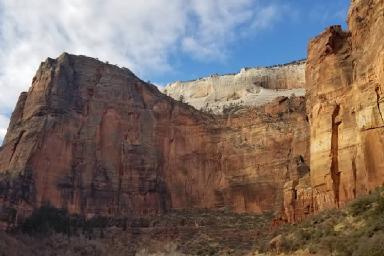
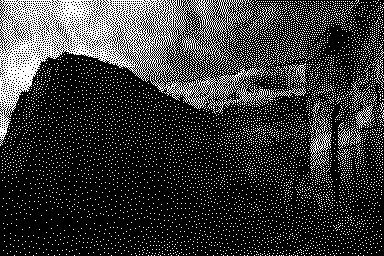
This example uses the default dithering options.
Original
Processed
 ## Recommendations
Regardless of dithering method, do both of the following to obtain the best results:
1. Scale the image _before_ dithering
1. Output the image to a lossless format such as GIF or PNG
The example below does both of these, and it sets the dithering palette to the three most dominant colors in the image.
```go-html-template
{{ with resources.Get "original.jpg" }}
{{ $opts := dict
"method" "ClusteredDotSpiral5x5"
"colors" (first 3 .Colors)
}}
{{ $filters := slice
(images.Process "resize 800x")
(images.Dither $opts)
(images.Process "png")
}}
{{ with . | images.Filter $filters }}
<img src="{{ .RelPermalink }}" width="{{ .Width }}" height="{{ .Height }}" alt="">
{{ end }}
{{ end }}
## Recommendations
Regardless of dithering method, do both of the following to obtain the best results:
1. Scale the image _before_ dithering
1. Output the image to a lossless format such as GIF or PNG
The example below does both of these, and it sets the dithering palette to the three most dominant colors in the image.
```go-html-template
{{ with resources.Get "original.jpg" }}
{{ $opts := dict
"method" "ClusteredDotSpiral5x5"
"colors" (first 3 .Colors)
}}
{{ $filters := slice
(images.Process "resize 800x")
(images.Dither $opts)
(images.Process "png")
}}
{{ with . | images.Filter $filters }}
<img src="{{ .RelPermalink }}" width="{{ .Width }}" height="{{ .Height }}" alt="">
{{ end }}
{{ end }}For best results, if the dithering palette is grayscale, convert the image to grayscale before dithering.
{{ $opts := dict "colors" (slice "222" "808080" "ddd") }}
{{ $filters := slice
  (images.Process "resize 800x")
  (images.Grayscale)
  (images.Dither $opts)
  (images.Process "png")
}}
{{ with images.Filter $filters . }}
  <img src="{{ .RelPermalink }}" width="{{ .Width }}" height="{{ .Height }}" alt="">
{{ end }}
The example above:
- Resizes the image to be 800 px wide
- Converts the image to grayscale
- Dithers the image using the default (
FloydSteinberg) dithering method with a grayscale palette - Converts the image to the PNG format